Home
NetBox Rack Design
Plan rack changes as versioned designs — on top of your real NetBox data, without touching it until you're ready.
▶ Watch the 2-minute quick tour · ▶ Full 10-part tutorial
NetBox Rack Design adds a lightweight design layer to NetBox for planning device adds, moves, and removals in your racks. A Design is a named, versioned proposal that overlays your live DCIM data: your real dcim.Device and dcim.Rack records stay untouched, and each planned change — add, move, or remove — is captured as a structured placement instead of a spreadsheet cell. This brings the intended rack layout into NetBox and renders it as a projected rack elevation, with power projection, an auto-naming engine, design chains (baselining one design on another approved one), and an explicit Apply step already built in.
The plugin is fully generic and public — nothing organization-specific is hardcoded. Status names and behavior are driven entirely by PLUGINS_CONFIG, and only native NetBox mechanisms are used (change logging, tags, custom fields, permissions, REST + GraphQL APIs, global search).
Features
Rack Design pairs a structured data model with an interactive visual editor for composing rack plans. Applying a design into NetBox, conflict detection within a design chain, and conflict detection between two unrelated designs planning the same rack are all delivered (see Roadmap).
- Three models for capturing rack plans:
- Design — a proposed set of rack changes for a site, scoped to one or more racks. Versioned (clone-and-tweak, with one approved version per plan), ordered for execution per site via an auto-assigned
sequence, may declare explicitdepends_onrelationships, may optionally belong to a group, and may bebased_onexactly one other approved design — forming a design chain (see docs/design-chains.md). Carriestitle,status,summary, generic externallink, plus description/comments/tags/custom fields. - DesignGroup — an optional, hierarchical container that links related designs into a larger effort (multi-stage work or cross-site coordination). Purely organizational; never affects execution order.
- DesignPlacement — a single proposed change within a design: add a new device from the device-type catalog (with an intended role and tenant), move an existing device, or remove (planned) one. Target slots are validated against NetBox's own
Rack.get_available_units()collision logic. Real devices are never mutated. - Interactive multi-rack visual editor — a GridStack drag-and-drop editor that renders all of a design's racks side by side, across both front and rear faces, for composing adds/moves/removes. Includes a searchable device-type catalog palette, per-user favorite device types for quick access, and per-user rack visibility to focus the workspace. Every edit writes placements only — live devices are never touched.
- Projected rack elevations — a read-only elevation view showing how a design's racks would look once applied (all racks, both faces, full-depth devices rendered across both faces), plus a filterable elevations list.
- Rack-page integration — an optional panel on the core
dcim.rackdetail page listing the designs that touch that rack, each linking to its editor and elevation. - Config-driven statuses — which device statuses count as "planned" and which mark a planned removal are read from
PLUGINS_CONFIG, never hardcoded. - Naming convention engine — auto-names planned devices via
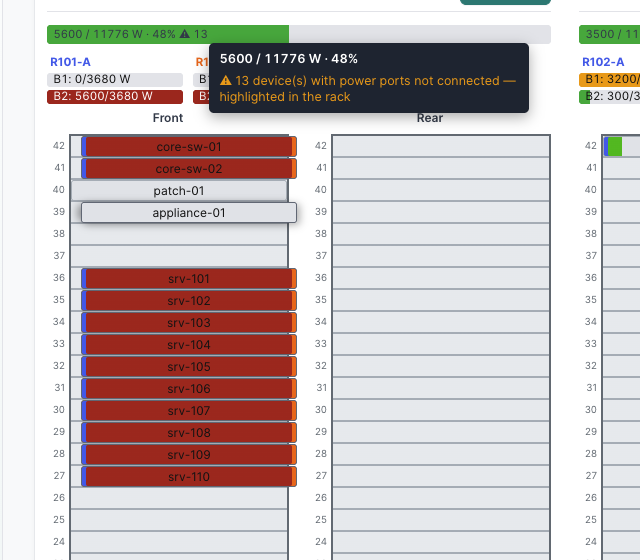
naming_mode=sequence/template/script(a dotted-path callable), with graceful fallback when a template or script fails. See docs/device-naming.md. - Power projection & PDU distribution — a read-only power overlay: a per-rack capacity-vs-projected-consumption bar plus a per-device power heatmap, and per-PDU/per-bank power distribution (
distribution_mode=none/builtin/script) with planned-PDU feed binding. See docs/power-projection-spec.md, docs/power-distribution.md, and docs/pdu-distribution-spec.md. - Apply a design — materialize an approved design in NetBox as planned devices: each target slot is reserved so nobody else can take it, planned cabling has real ports to attach to, and removals are flagged with a configured status. Safe to press twice (it reconciles rather than duplicating), all-or-nothing in one transaction, ordered along a chain, and run entirely with your own DCIM permissions. Available as a button and as an API action with a read-only dry run. See docs/apply.md.
- Design chains — baseline a design on another approved design (
based_on), so one team's moves/removes/adds render as the starting world for the next team's plan, across placements, naming and power. Approval freezes a design so its children can trust it; an ancestor that regresses to draft or moves toimplementedmakes the chain refuse (with a clear re-base prompt) rather than render a guess. See docs/design-chains.md. - Full CRUD UI with list/detail/edit/bulk views and a navigation menu.
- REST API at
/api/plugins/rack-design/. - GraphQL API integration.
- Global search integration.
- Change logging, tags, and custom fields on the models.
- Integration with NetBox's native permission system.
Screenshots
▶ Watch the 2-minute quick tour — the editor, moves, and the power heatmap in action.
▶ Full 10-part tutorial playlist — the data model, the editor, the naming engine, power projection and rebalancing, greenfield planned power, per-bank distribution, and the REST/GraphQL/search integrations, one part per topic.
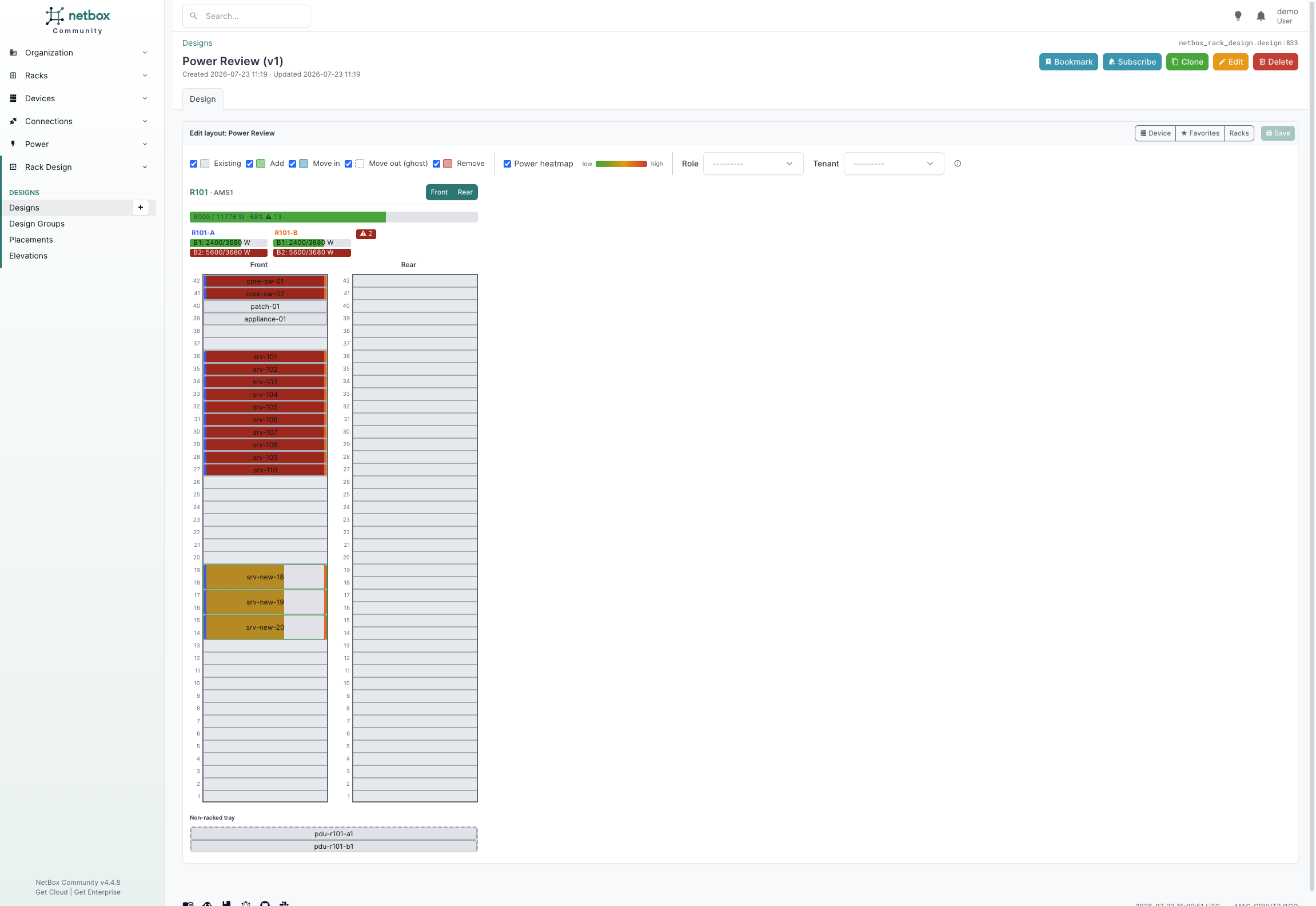
Power heatmap with per-PDU / per-bank distribution — each bank shows load vs. breaker, overloads in red, feeds color-coded per leg.
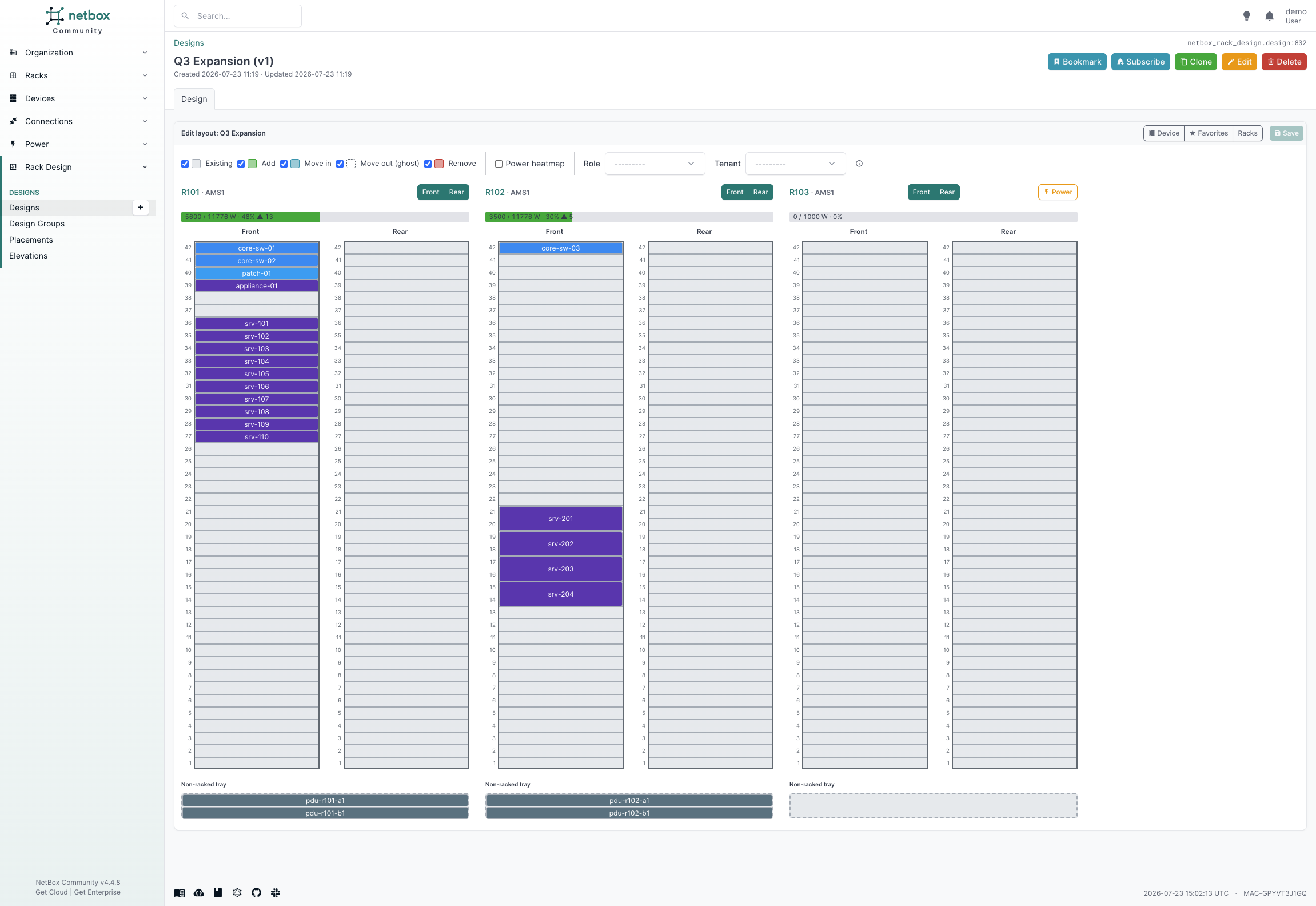
Multi-rack visual editor — plan adds, moves, and removals across a design's racks side by side, on top of your live data.
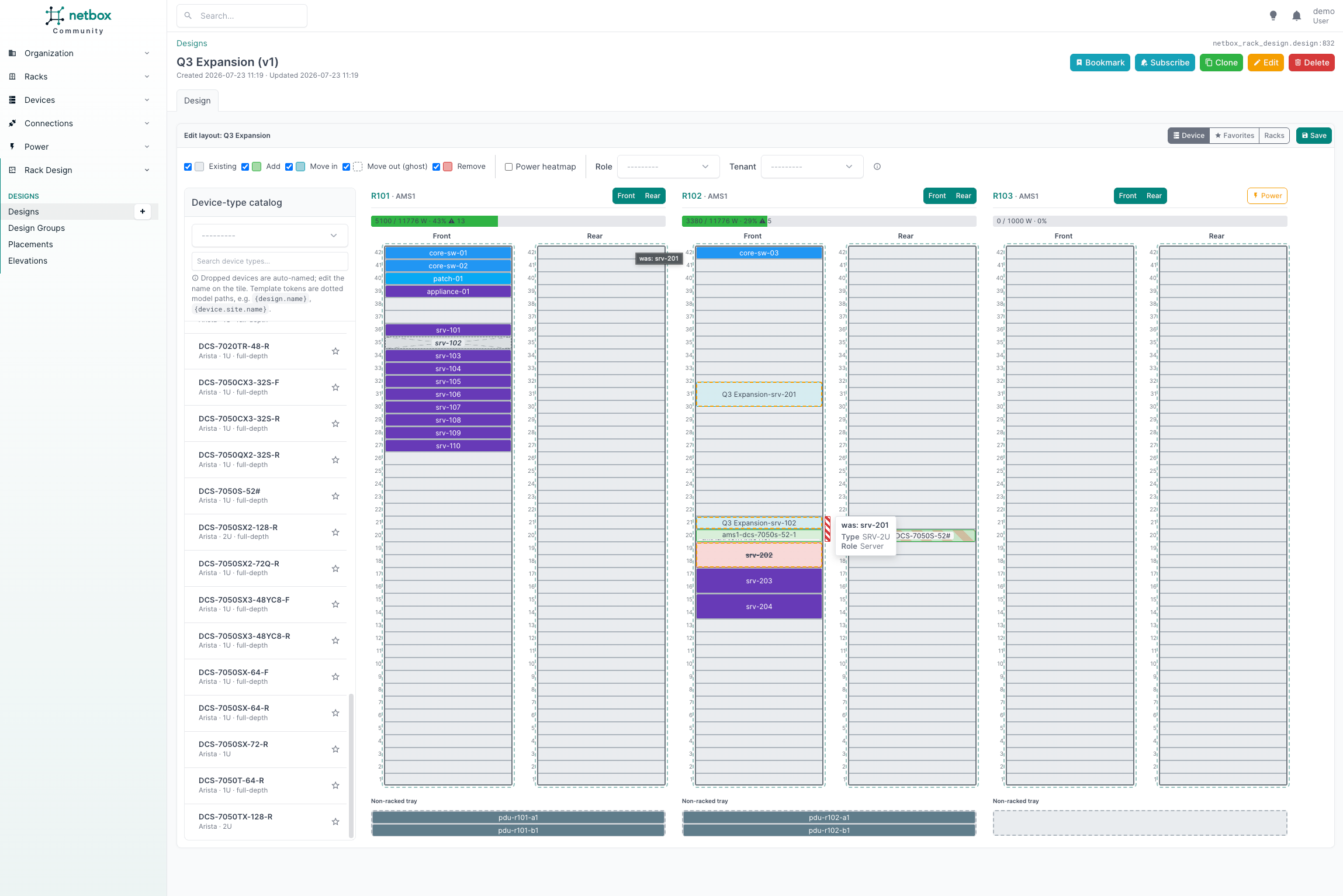
Device hover card — hover any tile to see its identity, type, role, and power
draw; a move-out ghost keeps its provenance (was: …) so you always know what
vacated a slot.
 |
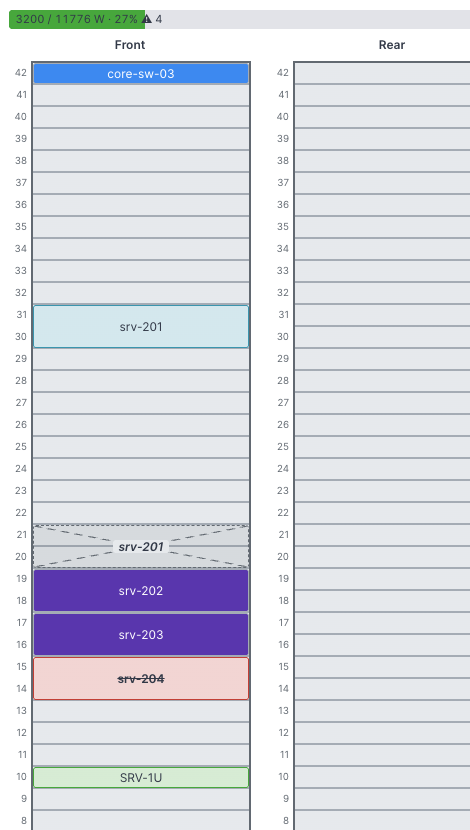 |
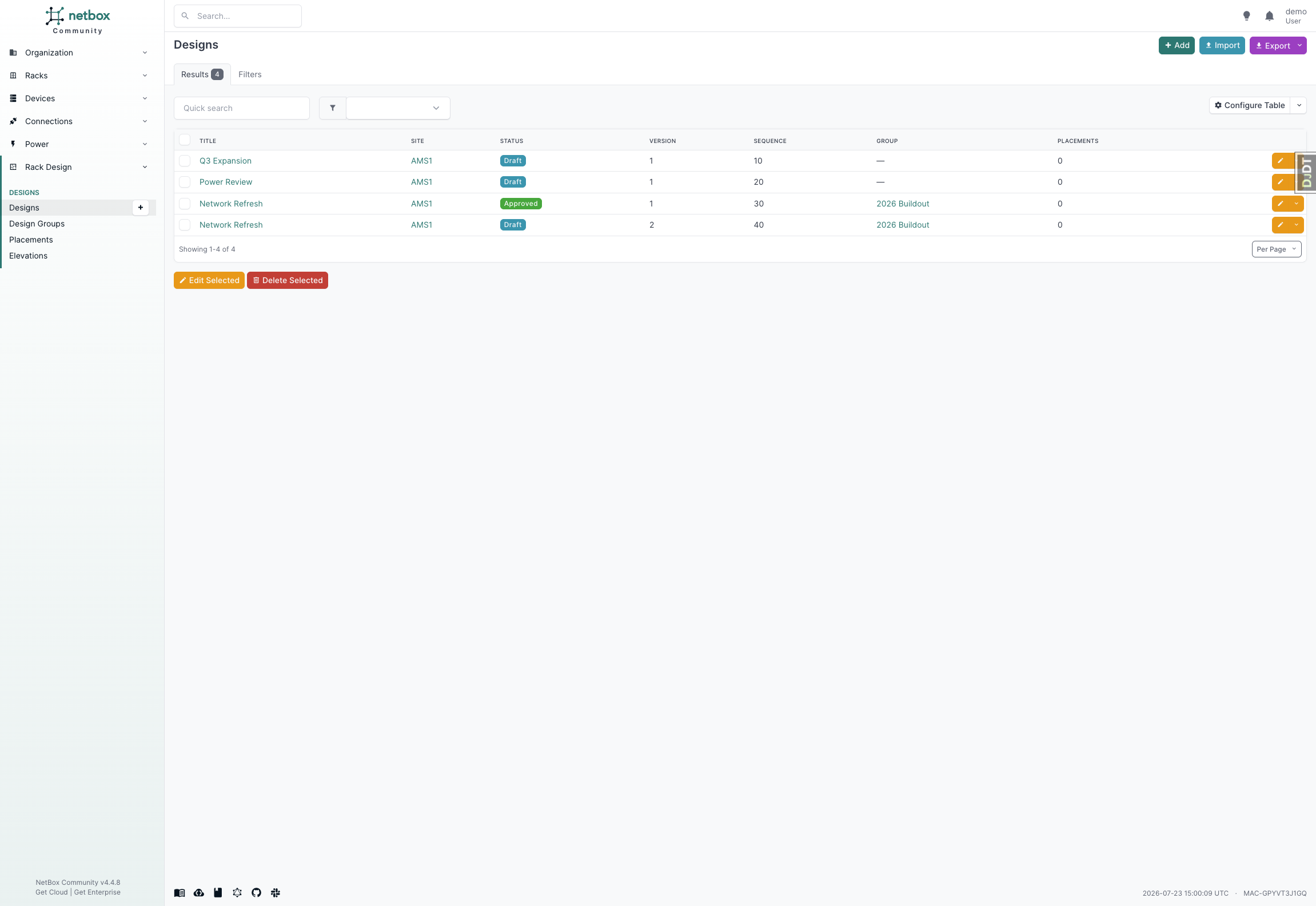
| Designs list — versioned plans, scoped to one or more racks. | Placement states: planned add, move-in, move-out ghost, and flagged removal. |
 |
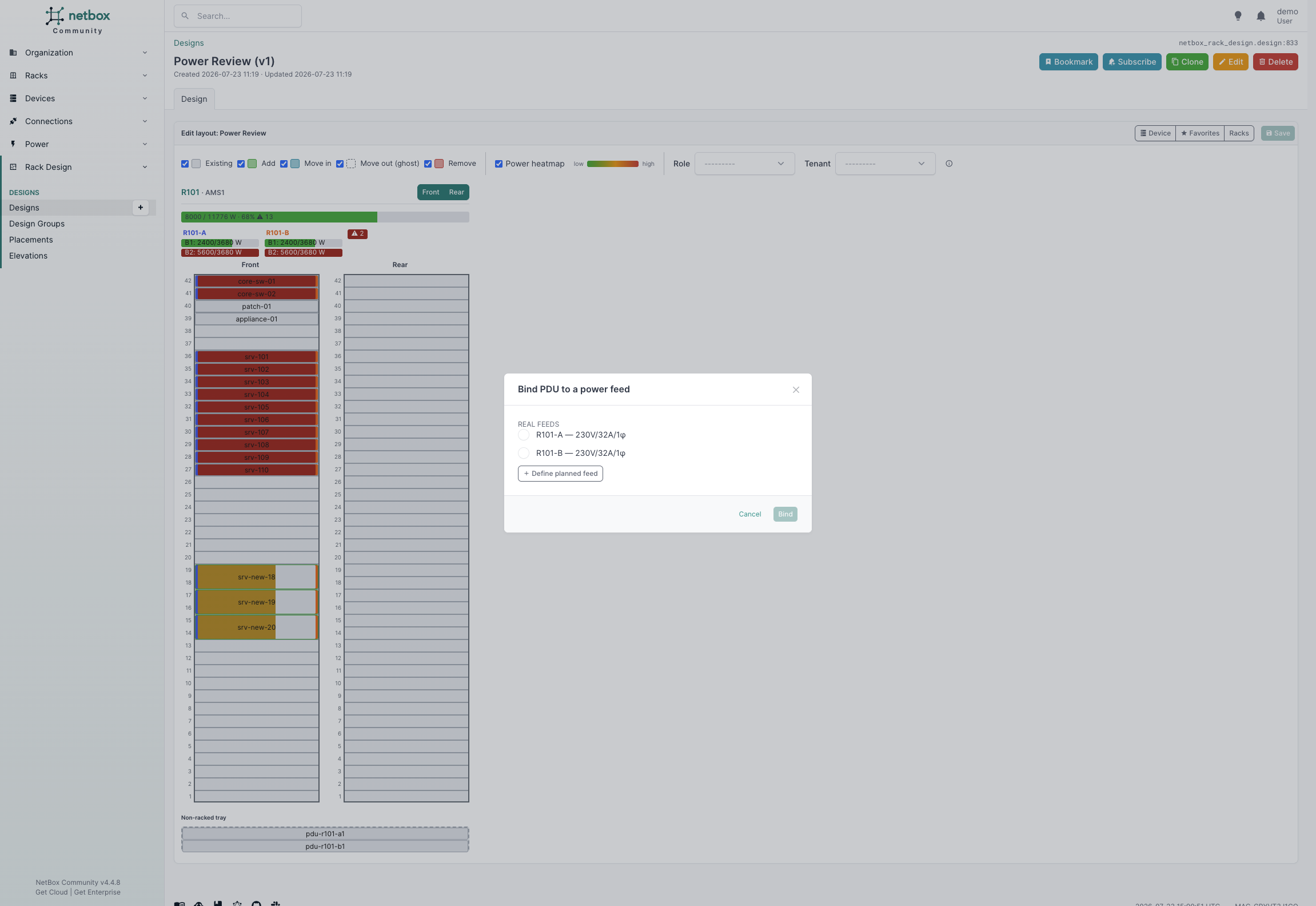 |
| Hover the ⚠ to see which powered devices aren't cabled yet. | Bind a planned PDU to a real or planned power feed. |
More in the documentation.
Compatibility
| Plugin Version | Minimum NetBox Version | Maximum NetBox Version | Python |
|---|---|---|---|
| 0.17.x | 4.4.0 | 4.6.99 | 3.12+ |
| 0.16.0 | 4.4.0 | 4.6.99 | 3.12+ |
| 0.15.x | 4.4.0 | 4.4.99 | 3.12+ |
The supported NetBox range is enforced at load time via the plugin's min_version / max_version. See COMPATIBILITY.md for the full per-version matrix.
Dependencies
- NetBox 4.4.0 – 4.6.99 (tested against 4.4.8, 4.5.10 and 4.6.8)
- Python 3.12 or later
No additional Python packages are required beyond NetBox's own dependencies.
Installation
Install from PyPI into the same environment as your NetBox installation:
pip install netbox-rack-design
For NetBox Docker, add netbox-rack-design to your plugin_requirements.txt. See the
netbox-docker plugin instructions.
Enable the plugin in your NetBox configuration (configuration.py, or plugins.py for netbox-docker):
PLUGINS = [
    "netbox_rack_design",
]

# Optional — defaults shown. Only include keys you want to override.
PLUGINS_CONFIG = {
    "netbox_rack_design": {
        "planned_status": "planned",
        "removal_status": "decommissioning",
        "default_status": "draft",
        "enable_rack_panel": True,
    },
}
Note on
removal_status. The defaultdecommissioningis the only native removal-oriented device status on a vanilla install. Ifdecommissioningis destructive in your environment (e.g. it auto-deletes devices or triggers an external dismantle workflow), do not use it for planned removals. Instead add a safe custom status via NetBox'sFIELD_CHOICES(fordcim.Device.status, e.g.to_decommission) and pointremoval_statusat it.
Apply migrations, collect the plugin's static files, and restart NetBox:
python manage.py migrate
python manage.py collectstatic --no-input
# then restart your NetBox services (e.g. systemctl restart netbox netbox-rq)
Upgrading
pip install --upgrade netbox-rack-design
python manage.py migrate
python manage.py collectstatic --no-input
# then restart your NetBox services (e.g. systemctl restart netbox netbox-rq)
Run migrate before using the plugin again: most releases add or change
model fields, and NetBox will raise a database error on any view that reads a
column the upgrade introduced.
Do not skip collectstatic. The rack editor is a JavaScript application served
from the plugin's own static files, so an upgrade that ships new assets leaves
the previous ones in place until they are collected — the editor then loads
against stale CSS and JS, which shows up as broken layout or drags that do
nothing rather than as an error.
Two things to check before upgrading:
- COMPATIBILITY.md — the NetBox version range each plugin release supports. Upgrading the plugin does not upgrade NetBox, and a plugin whose declared range excludes your NetBox will refuse to load.
- CHANGELOG.md — behaviour
changes are listed per release under
### Changed, and anything that needs action on your side is called out under a bold Breaking Changes heading.
Designs, placements and power rows are ordinary NetBox objects, so a downgrade
is only safe back to the release whose migrations your database still matches;
python manage.py migrate netbox_rack_design <number> unapplies to a specific
migration if you need to step back.
Configuration
All settings are optional and configured under the netbox_rack_design key in PLUGINS_CONFIG.
| Key | Default | Description |
|---|---|---|
planned_status |
"planned" |
The device status the plugin treats as "planned". |
removal_status |
"decommissioning" |
The device status that marks a planned removal. Override with a safe custom status where decommissioning is destructive (see note above). |
default_status |
"draft" |
Default lifecycle status for a new Design. |
enable_rack_panel |
True |
Show the rack-page panel listing designs that touch a rack. |
naming_mode |
"sequence" |
How a placement's proposed name is computed: "sequence" (<design title>-<n>), "template" (a str.format template over real model objects), or "script" (a dotted path to fn(placement) -> str). See docs/device-naming.md. |
naming_template |
"{design.name}-{n}" |
Template used when naming_mode == "template". Dotted attribute paths on the real Design/Device objects; {design.name} aliases the design title. |
naming_script |
"" |
Dotted path to a callable used when naming_mode == "script". |
naming |
{} |
Reserved for future per-design naming options. No options are currently defined. |
distribution_mode |
"none" |
How per-PDU/bank load is distributed for the power heatmap: "none" (per-rack total only, per-device gradient), "builtin" (native distribution from bank = outlet port name segment + feed-leg = bound feed, zero config), or "script" (a dotted path to fn(rack, devices) -> Distribution dict). See docs/pdu-distribution-spec.md. |
distribution_script |
"" |
Dotted path to a callable used when distribution_mode == "script". |
planning_fields |
{} |
Custom-field bridge mapping site custom fields into the rack/PDU planning dialogs. Empty by default; native fields (voltage/amperage/phase/supply, feed binding) are never listed here. |
power_capacity_default_w |
1000 |
Fallback rack power capacity (watts) used when no dcim.PowerFeed is modeled on the rack. Not present in default_settings; read via get_plugin_config with this default. |
power_draw_basis |
"allocated" |
Which PowerPort/PowerPortTemplate field to sum for projected draw: "allocated" or "maximum" (falls back to the other when the chosen one is unset). Not present in default_settings; read via get_plugin_config with this default. |
power_warn_pct |
80 |
Utilization percentage at/above which a rack's power state is "warn". Not present in default_settings; read via get_plugin_config with this default. |
power_critical_pct |
100 |
Utilization percentage at/above which a rack's power state is "critical". Not present in default_settings; read via get_plugin_config with this default. |
power_exclude_roles |
("pdu", "unmanageable-pdu") |
Device role slugs (case-insensitive) excluded from the power-consumption sum — power infrastructure, not consumers. Not present in default_settings; read via get_plugin_config with this default. |
peer_conflicts_enabled |
True |
Whether a design's projection reports conflicts with designs outside its own chain (peer designs planning the same unit, name, or device). A peer design's title is disclosed in these reports even past NetBox object permissions, since a conflict without a name to act on is not actionable; set to False to disable peer detection entirely if that disclosure is unacceptable. See docs/peer-conflicts.md. |
The power_* keys are not listed in the plugin's default_settings (they have no admin-facing default in __init__.py); they are still fully overridable via PLUGINS_CONFIG, resolved at read time by netbox_rack_design/projection.py with the defaults shown above.
Roadmap
Delivered
- Projected rack elevations (read-only) — see how a design's racks would look once applied, with front/rear faces and full-depth devices rendered across both faces.
- Interactive visual rack editor — GridStack drag-and-drop adds/moves/removes across a multi-rack workspace and both rack faces, writing placements without mutating live devices. Includes a searchable device-type catalog palette, per-user favorite device types, and per-user rack visibility.
- Multi-rack designs — a design carries an explicit, site-validated rack scope and a read-only elevation view spanning all of its racks.
- Naming convention engine — auto-names planned devices via
naming_mode="sequence"/"template"/"script", with graceful fallback when a template or script fails. - Power projection — config-driven capacity vs. projected consumption per rack, rendered as a capacity bar plus a per-device power heatmap.
- PDU power distribution — per-PDU/per-bank load distribution (
distribution_mode="none"/"builtin"/"script"), planned-PDU feed binding for greenfield racks, and a per-bank heatmap. - Design chains and versioning — baseline a design on another approved design (
based_on), inheriting its placements, names, family-numbering counters, planned power feeds and rack-power overrides as a read-only, live-resolved layer. Approval freezes a design so it is safe to build on; an ancestor that is not approved, or has moved toimplemented, makes the whole chain refuse to project (never a silent guess) until re-based. Clone-and-revise an approved design into a new draft version to escape the freeze when you have dependents, then re-base the children onto the new version. See docs/design-chains.md. - Apply — materialize an approved design in NetBox as planned devices, reserving each target slot and flagging removals with a configured status. Reports every problem up front, runs all-or-nothing in one transaction, is safe to re-run (reconciles rather than duplicating), is ordered along a chain, and uses the acting user's own DCIM permissions. Button plus API action with a read-only dry run. See docs/apply.md.
- Peer conflicts — a design's projection reports overlaps with designs outside its own chain: a peer planning a device on the same unit, the same name, or a move of the same real device, surfaced as its own row in the editor's conflicts panel and as flagged tiles on both the editor and the elevation view, with a "Re-run naming" dialog to resolve a name claim. See docs/peer-conflicts.md.
Planned for upcoming stages
- Template-driven export — generate work documents from a design via NetBox's native Export Templates.
Support
- Documentation: https://ravenrs.github.io/netbox-rack-design/
- Issues / bug reports / feature requests: https://github.com/ravenrs/netbox-rack-design/issues
When reporting a bug, please include your NetBox version, plugin version, Python version, steps to reproduce, and expected vs. actual behavior.
Contributing
Contributions are welcome. Please see CONTRIBUTING.md for guidelines.
License
Licensed under the Apache License 2.0.
This package was created with Cookiecutter and the netbox-community/cookiecutter-netbox-plugin template.